While trying to connect Dynamics 365 from a WCF service hosted in IIS, I came across to this error message:
Message Metadata contains a reference that cannot be resolved: ‘https://url.dynamics.com/XRMServices/2020/Organization.svc?wsdl&sdkversion=9’. >> StackTrace at System.ServiceModel.Description.MetadataExchangeClient.MetadataRetriever.Retrieve(TimeoutHelper timeoutHelper)\r\n at System.ServiceModel.Description.MetadataExchangeClient.ResolveNext(ResolveCallState resolveCallState)\r\n at System.ServiceModel.Description.MetadataExchangeClient.GetMetadata(MetadataRetriever retriever)\r\n at System.ServiceModel.Description.MetadataExchangeClient.GetMetadata(Uri address, MetadataExchangeClientMode mode)\r\n at Microsoft.Xrm.Sdk.Client.ServiceMetadataUtility.RetrieveServiceEndpointMetadata(Type contractType, Uri serviceUri, Boolean checkForSecondary)\r\n
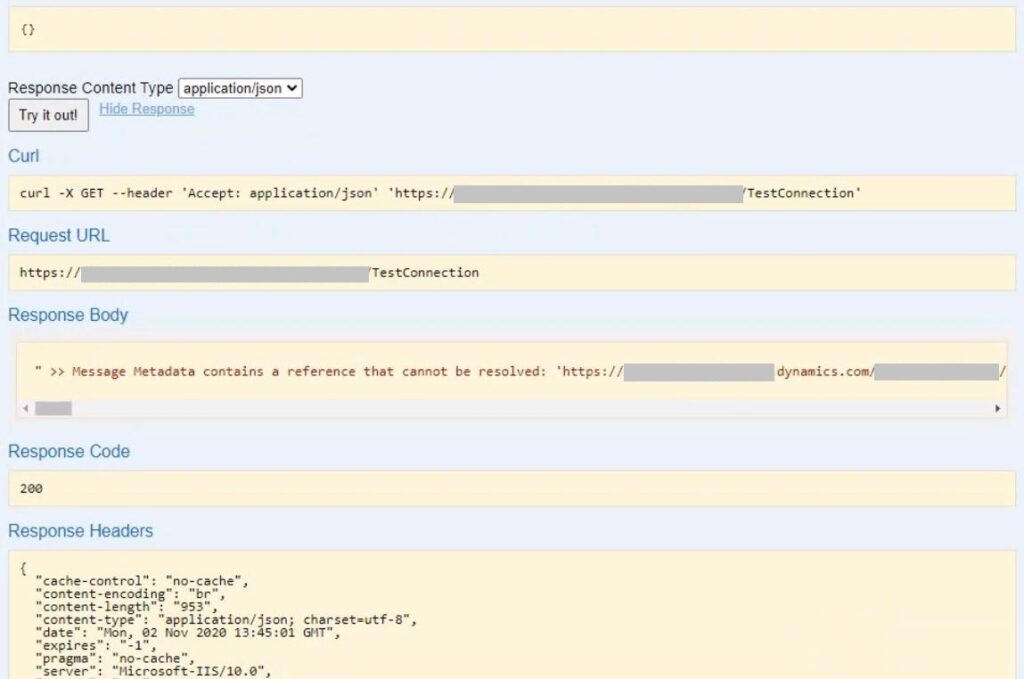
We also saw the error below during testing:
InnerException System.Net.WebException: Unable to connect to the remote server —> System.Net.Sockets.SocketException: A connection attempt failed because the connected party did not properly respond after a period of time, or established connection failed because connected host has failed to respond at System.Net.Sockets.Socket.DoConnect(EndPoint endPointSnapshot, SocketAddress socketAddress)\r\n at
Root Cause
As mentioned in this Microsoft article, Dynamics 365 started requiring TLS 1.2 after version 9.x (For Government edition, version 8.2). Therefore, connections that don’t use TLS 1.2 started failing after this update.
Any connections to Dynamics 365 (online) version 9.x or Dynamics 365 (online) Government version 8.2 will fail if they do not use TLS 1.2 security protocol. This will impact several Dynamics services (listed below), including access to the Dynamics 365 Customer Engagement web application.
Solution for “Message Metadata contains a reference that cannot be resolved” error
You can solve this issue by forcing WCF service to use TLS 1.2. Sample code is below.
ServicePointManager.SecurityProtocol = SecurityProtocolType.Tls12;If the issue still persists, check out the other TLS related errors below.